Preseto
Preset DYSTOPIA
Preset DYSTOPIA
Couldn't load pickup availability
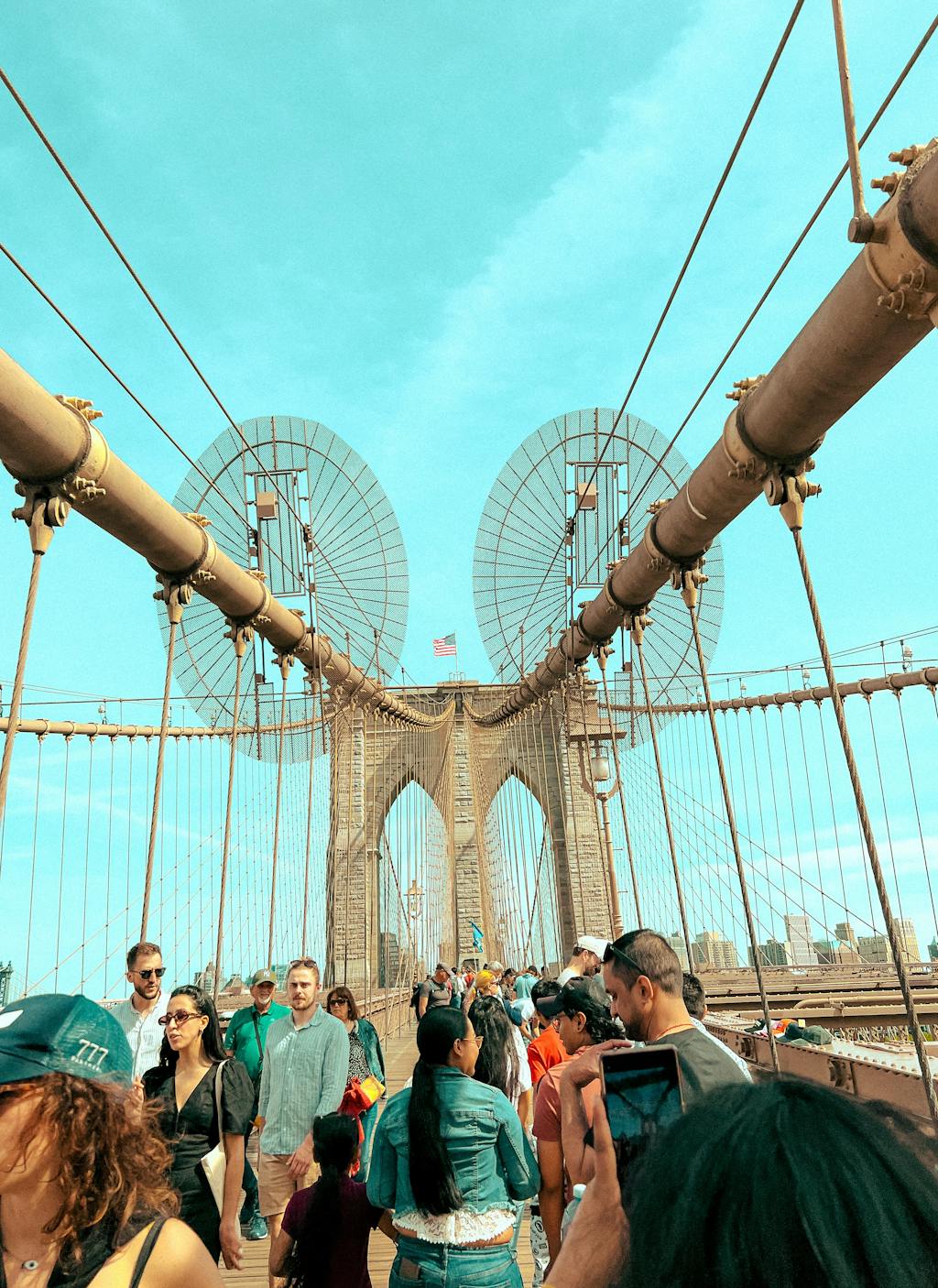
The Dystopia Lightroom preset is a set of 10 presets that give photos a dark, futuristic, and dramatic atmosphere inspired by the aesthetics of post-apocalyptic films and cyberpunk worlds.
Perfect for urban photography, industrial scenes, night shots, neon portraits, and creative compositions designed to evoke strong emotions.
The Dystopia preset darkens the frame, enhances contrast, and highlights metallic, cool tones—from shades of blue to subtle purple accents.
Different versions of the presets allow you to create both a heavy, oppressive mood and a sharper, neon look. Subtle grain and muted highlights add character reminiscent of a dystopian universe.
After purchase, you receive:
✔️ 10 XMP presets for Lightroom Classic / CC
✔️ 10 DNG presets for Lightroom Mobile
✔️ step-by-step installation guide
✔️ practical editing tips
The preset is easy to customize—usually, you just need to adjust:
- Exposure
- Shadows & Blacks
- Temperature / Tint
The Dystopia pack is perfect for creators who want to add a disturbing, futuristic mood to their photos and create an atmosphere of mystery and tension.
With the Dystopia preset, your photographs will transform into dark, dramatic shots inspired by the future-noir world—intense, emotional, and full of cinematic depth. 🌒🟣📸
Share
Why choose it?
-
✨ Repeatable style
Each pack contains 10 preset variants in one style. This means that you can match the same preset to different photos while maintaining the photos' atmosphere.
-
⏳ Time saving
If you edit hundreds of photos, you will definitely appreciate how quickly you can apply our presets to your images. Often, just one click is enough to achieve the effect.
-
✉️ Technical support
Installing presets for the first time? If you have any problems, you can always write to us, and we will help you with the installation.
Get a FREE preset pack!
Join our newsletter and receive the Lagoon Package. No spam, we promise.
Posty na blogu
View all-
Canva Free czy Canva Pro? Porównanie oferty
Canva Free i Canva Pro to dwie wersje tej samej platformy — ale ich możliwości różnią się bardziej niż mogłoby się wydawać. Darmowe konto pozwala stworzyć większość podstawowych projektów. Płatny...
Canva Free czy Canva Pro? Porównanie oferty
Canva Free i Canva Pro to dwie wersje tej samej platformy — ale ich możliwości różnią się bardziej niż mogłoby się wydawać. Darmowe konto pozwala stworzyć większość podstawowych projektów. Płatny...
-
Canva dla Edukacji: Czym jest dla Nauczycieli? ...
Canva dla Edukacji to bezpłatna wersja Canva Pro dostępna dla nauczycieli i uczniów. Zawiera wszystkie funkcje płatnego planu — bez żadnych opłat. Można tworzyć prezentacje, plakaty, materiały dydaktyczne, infografiki i...
Canva dla Edukacji: Czym jest dla Nauczycieli? ...
Canva dla Edukacji to bezpłatna wersja Canva Pro dostępna dla nauczycieli i uczniów. Zawiera wszystkie funkcje płatnego planu — bez żadnych opłat. Można tworzyć prezentacje, plakaty, materiały dydaktyczne, infografiki i...
-
Jak zainstalować szablony w Canva? Wszystko co ...
Kupiłaś szablony i masz przed sobą link do folderu. Co teraz? Dla wielu osób ten moment jest bardziej zagadkowy niż powinien być — szczególnie jeśli wcześniej nie korzystałaś z Canvy...
Jak zainstalować szablony w Canva? Wszystko co ...
Kupiłaś szablony i masz przed sobą link do folderu. Co teraz? Dla wielu osób ten moment jest bardziej zagadkowy niż powinien być — szczególnie jeśli wcześniej nie korzystałaś z Canvy...